


Use the FoxPhone Public API to list the cloud phones and proxies in your account and to submit bulk device resets and proxy bindings. The current version provides these four endpoints.
1. Prepare an API key
Click the avatar in the upper-right corner, select Settings, then open the API Key page in your account profile.
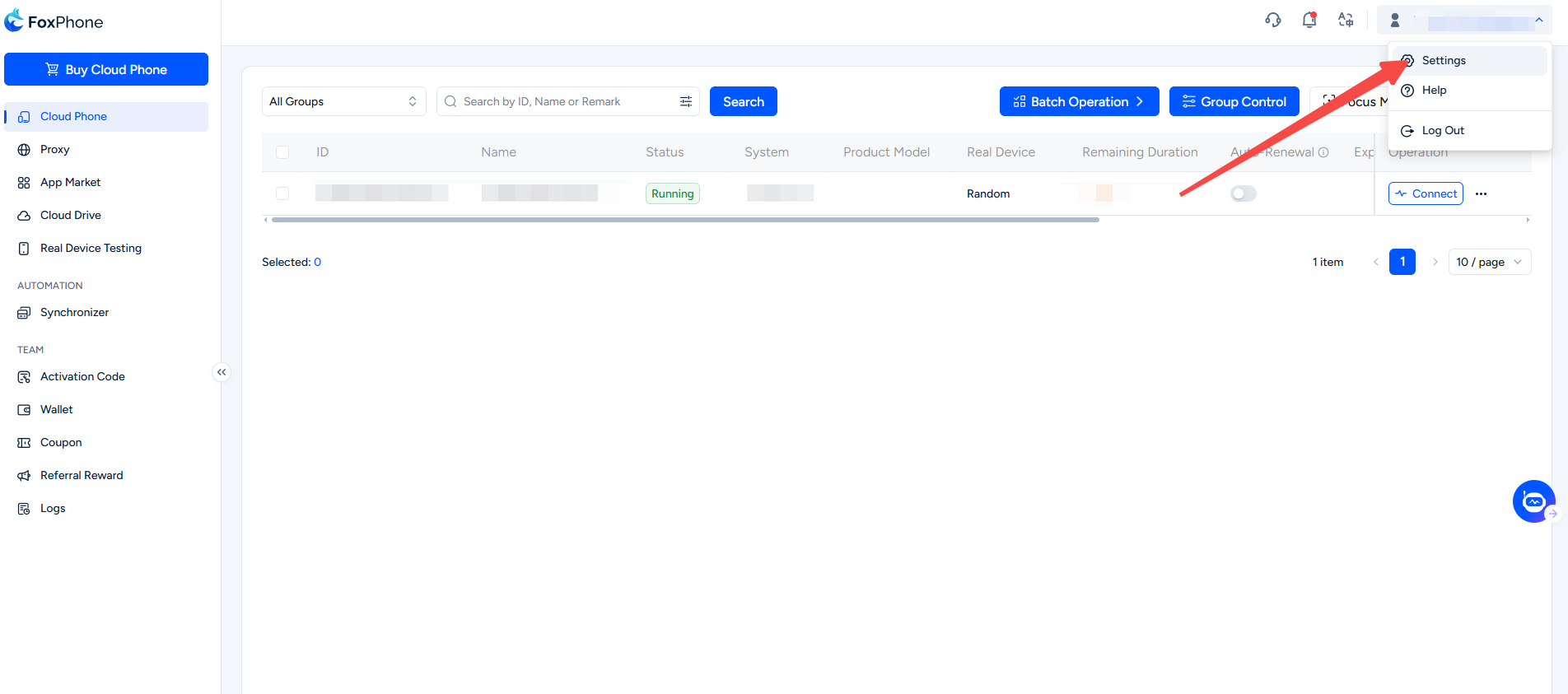
Generate a key on the API Key page. Each account can have only one active key:
- Regenerating a key immediately invalidates the previous key.
- Disabling a key immediately rejects all Public API requests.
- The full key is shown only once when it is created. Store it in a controlled secrets manager.
Send the key in a request header:
X-API-Key: <your_api_key>Security note: Never put an API key in a URL, request body, source code, logs, or support tickets. Resource IDs and keys in this guide are placeholders.
2. General rules
- Production base URL:
https://api.foxphone.com/public_api/v1 - All four endpoints share a rate limit of 60 requests per minute per API key.
- For list parameters,
page_numdefaults to1;page_sizedefaults to20, has a maximum of100;searchis optional. - Bulk requests accept 1 to 100
pod_ids; the server removes duplicates automatically. - You can access only resources belonging to the account that owns the API key. The API does not let you select another account.
- If preflight finds an invalid resource or a conflicting operation in the batch, none of the requests are submitted.
- If some operations fail after remote submission begins, accepted operations are not rolled back. The response lists successful and failed items separately.
3. List cloud phones
Use this endpoint to list the cloud phones in the current account:
GET /public_api/v1/phones?page_num=1&page_size=20&search=pod-exampleUse search to find a cloud phone by name or pod_id.
Request example:
curl --fail-with-body
  -H "X-API-Key: $API_KEY"
  "https://api.foxphone.com/public_api/v1/phones?page_num=1&page_size=20&search=pod-example"
Response example:
{
  "total": 1,
  "phones": [
    {
      "pod_id": "pod-example-001",
      "name": "automation-phone",
      "online_status": 1,
      "operating_status": 0,
      "proxy_id": "42"
    }
  ]
}
proxy_id is 0 when the phone has no proxy bound.
4. List proxies
Use this endpoint to list the proxies in the current account:
GET /public_api/v1/proxies?page_num=1&page_size=20&search=42Use search to find a proxy by name or proxy_id. The endpoint does not return proxy usernames or passwords.
Request example:
curl --fail-with-body
  -H "X-API-Key: $API_KEY"
  "https://api.foxphone.com/public_api/v1/proxies?page_num=1&page_size=20&search=42"
Response example:
{
  "total": 1,
  "proxies": [
    {
      "proxy_id": "42",
      "name": "us-residential",
      "proxy_type": "http",
      "proxy_ip": "203.0.113.42",
      "proxy_port": "10000",
      "check_status": "available"
    }
  ]
}
5. Submit bulk device resets
Use this endpoint to submit device reset tasks in bulk:
POST /public_api/v1/phones/actions/reset
Content-Type: application/json
Request body:
{
  "pod_ids": ["pod-example-001", "pod-example-002"]
}
Current limitation: The reset endpoint does not support specifying proxy_id or any other proxy parameter in the request body. To change a proxy, wait for the reset to finish, then call the bulk bind-existing-proxy endpoint.
Request example:
curl --fail-with-body
  -X POST
  -H "Content-Type: application/json"
  -H "X-API-Key: $API_KEY"
  --data '{"pod_ids":["pod-example-001","pod-example-002"]}'
  "https://api.foxphone.com/public_api/v1/phones/actions/reset"
If a phone already has a reset task in progress, a new request returns RESET_IN_PROGRESS during preflight and does not submit a duplicate task.
6. Bind an existing proxy in bulk
First get the proxy_id from the proxy list, then call this endpoint:
POST /public_api/v1/proxies/{proxy_id}/bind
Content-Type: application/json
Request body:
{
  "pod_ids": ["pod-example-001", "pod-example-002"]
}
Request example:
curl --fail-with-body
  -X POST
  -H "Content-Type: application/json"
  -H "X-API-Key: $API_KEY"
  --data '{"pod_ids":["pod-example-001","pod-example-002"]}'
  "https://api.foxphone.com/public_api/v1/proxies/42/bind"
The proxy and all phones must belong to the current account. A powered-off phone can be bound. Phones undergoing a reset, power operation, reboot, or another proxy operation are rejected during preflight.
7. Bulk responses
Device reset and proxy binding use the same response structure:
{
  "successful_pod_ids": ["pod-example-001"],
  "failed_items": [
    {
      "pod_id": "pod-example-002",
      "code": "PROVIDER_REJECTED",
      "message": "provider rejected the operation"
    }
  ]
}
A preflight failure returns HTTP 409 with error code BATCH_PRECHECK_FAILED. The error metadata's failed_items lists the relevant pod_id, code and message; no requests in the batch are submitted.
Failures after remote acceptance begins are reported in the business response through successful_pod_ids and failed_items.
8. Common errors
| HTTP status | Error code | Description |
|---|---|---|
| 400 | INVALID_ARGUMENT | Invalid parameter format, item count, or pagination value |
| 401 | INVALID_API_KEY | API key is missing, malformed, or invalid |
| 403 | API_KEY_DISABLED | API key is disabled |
| 403 | USER_ACCOUNT_UNAVAILABLE | The account that owns the API key is unavailable |
| 409 | BATCH_PRECHECK_FAILED | Bulk preflight failed; nothing was submitted |
| 429 | RATE_LIMIT_EXCEEDED | The per-minute request limit was exceeded |
When you receive HTTP 429, retry later using backoff. For HTTP 409, first use failed_items to resolve the resource state; do not immediately resubmit the same request.


