


Cloud Phone: The Powerful Cloud-Based Android Solution
Remotely control thousands of Android phones to manage multiple mobile accounts with FoxPhone. Operate like a real mobile user and manage accounts seamlessly.
 No Local Performance Load 24/7 Cloud-Based Operation Supports All Mainstream Mobile Games Stable Environment & Reliable Connections

A Full Upgrade: Experience Superior Cloud Performance
Traditional Local Solutions
 Rely on PC performance and consume significant memory. Usually limited to one PC, restricting multi-instance support. Dependent on local networks, prone to firewall or regional restrictions. Require installation, which can be complex and time-consuming. Limited scalability with noticeable performance bottlenecks.


FoxPhone Key Features:
Runs in the cloud without using local resources, enabling easy multi-instance access. Supports multiple instances simultaneously for efficient multi-account management. Provides stable networks with real IPs and minimal restrictions. Ready to use instantly, no heavy software installation required. Flexible scalability with controllable multi-instance capacity.Why is FoxPhone the Best Alternative to Android Emulators?

Operational Environment
FoxPhone provides access to actual Android phones hosted in the cloud, ensuring your apps run in a genuine mobile environment.
Performance and Compatibility
Built for account management, FoxPhone delivers high performance and broad platform compatibility.
Accessibility
Manage your accounts anywhere with FoxPhone’s cloud-based solution—far more flexible than PC-bound emulators.
Bulk Management
Easily manage multiple accounts simultaneously with FoxPhone’s streamlined interface. This is ideal for high-volume tasks.
Automation
Automate repetitive tasks like logins, posting, and interactions, saving you significant time and resources.
Resource Usage
FoxPhone runs in the cloud, so multiple instances won’t slow down your computer—unlike heavy emulators. Multi-account management
Create Multiple Accounts In Mobile Apps
Manage multiple accounts from one dashboard with cloud phones. Each appears as a unique user, helping you operate seamlessly safely.
Get Started

 Next-level efficiency
Synchronize Actions Across Multiple Accounts
Use automation tools to synchronize actions and automate account warm-up across your game accounts, saving time and improving gaming efficiency.
Get Started
Support for All the Hottest Mainstream Games
Multi-open Your Games In 3 Simple Steps

Sign up with FoxPhone
Register and activate your cloud phone, then create an instance.


Install App
Install the game app you want to play on the cloud phone.
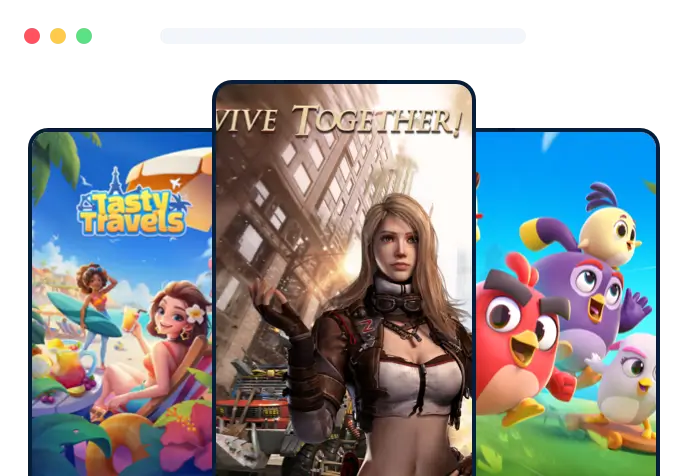
Multi-Open Games
Launch multiple instances to run different accounts simultaneously.Find Answers Fast!
Solve common issues without waiting!
 You have different questions?
Our team will answer all your questions. We ensure a quick response.
What is the main difference between FoxPhone and a local Android emulator?
FoxPhone is a cloud phone solution that runs virtual Android devices in the cloud, offering 24/7 uptime with zero local resource usage, unlike local Android emulators that consume your PC's CPU, RAM, and storage.
Why should I choose FoxPhone cloud phone over traditional Android emulators?
FoxPhone provides superior cloud-based Android performance, multi-instance Android support, and remote access without tying up your computer's resources, making it ideal for gaming, testing, and multi-account management.
Can FoxPhone run multiple Android instances 24/7 without my PC being on?
Yes, as a cloud Android platform, FoxPhone hosts multi-instance Android environments on remote servers, ensuring continuous operation even when your local device is powered off.
How does FoxPhone save PC resources compared to Android emulators?
FoxPhone's android cloud hosting eliminates local resource occupancy by running cloud android phones entirely in the cloud, freeing your PC for other tasks unlike resource-heavy emulators.
Is FoxPhone a better virtual Android device for long-term app running?
Absolutely, FoxPhone's remote Android solution delivers real device environments with optimal performance and 24/7 availability, surpassing local emulators that require constant PC power.
What makes FoxPhone's cloud-based Android superior for game testing?
FoxPhone offers a cloud phone solution with multi-instance Android capabilities, high-performance cloud android hosting, and no hardware limitations, perfect for uninterrupted game testing and automation.
Can I manage multiple accounts using FoxPhone without local emulators?
Yes, FoxPhone's cloud Android platform supports unlimited multi-instance Android setups for secure multi-account management, with zero impact on your local hardware.
How does FoxPhone ensure better uptime than local Android emulators?
As a dedicated cloud phone, FoxPhone runs virtual Android devices on always-on cloud servers, providing reliable 24/7 remote Android solution regardless of your PC status.
Why is FoxPhone ideal for developers needing cloud Android phones?
FoxPhone delivers a scalable cloud-based Android environment for testing, with superior speed, real fingerprints, and android cloud hosting that outperforms any local emulator setup.
What are the key advantages of FoxPhone as a cloud android platform?
FoxPhone excels with zero local resource usage, multi-instance Android support, enhanced performance, and 24/7 cloud phone availability, making it the top remote Android solution for all scenarios.
You have different questions?Our team will answer all your questions. We ensure a quick response.
FoxPhone - A More Stable Cloud-Based Android Solution.
Manage multiple accounts on one cloud device with ease. Secure, stable, and effortless—just like an expert.
Get Started

© 2026 FoxPhone. All rights reserved.


 Cookie Notice
See Real Feedback From FoxUsers
Game Streamer
Mobile App Developer
Cybersecurity Consultant
Game Studio Manager
Product Manager
QA Lead Engineer